Post
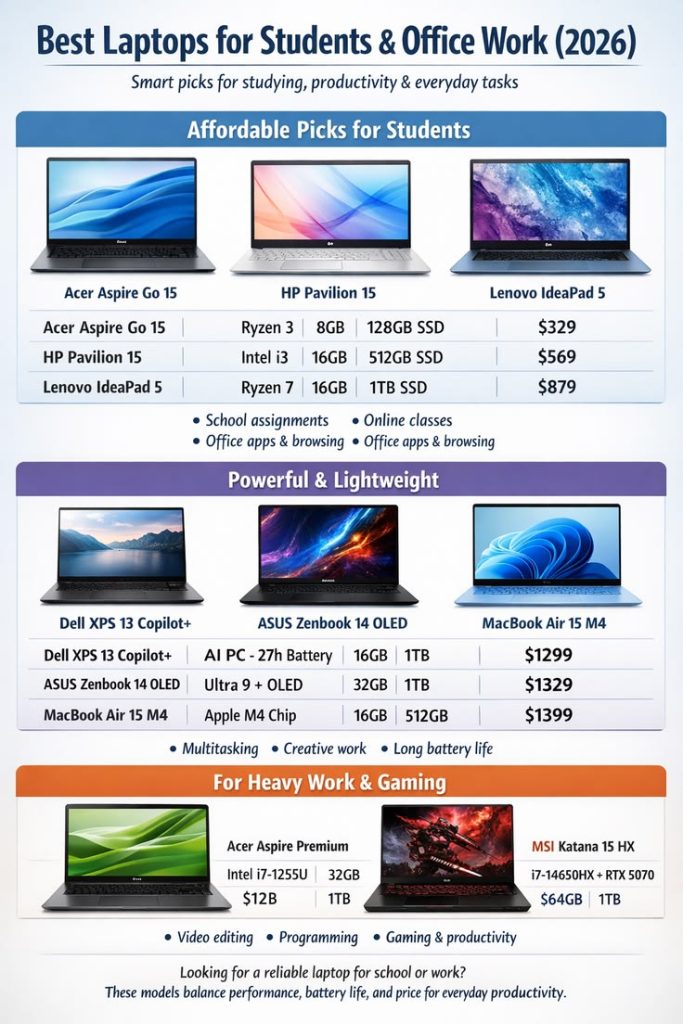
Choosing the Right Dell Laptop for Students
Jun
Choosing the Right Dell Laptop for Students
In today’s education environment, a laptop has become one of the most important tools for student success. Whether attending online classes, completing assignments, conducting research, participating in virtual meetings, coding software projects, creating presentations, or collaborating with classmates, students need a reliable laptop that can support their academic journey. With numerous options available on the market, selecting the right device can be challenging.
Dell has established itself as one of the most trusted laptop manufacturers worldwide, offering a wide range of models designed to meet the needs of students at different educational levels and budgets. From affordable everyday laptops to premium ultrabooks and high-performance workstations, Dell provides solutions for virtually every academic requirement.
In this comprehensive guide, we’ll explore how to choose the right Dell laptop for students, examine the most important features to consider, and highlight the best Dell laptop categories for different fields of study.

Why Dell Is a Popular Choice for Students
Dell has remained a favorite among students for many years because of its balance of performance, affordability, reliability, and innovation.
Key Advantages of Dell Laptops
Dell offers:
- Reliable performance
- Durable construction
- Excellent battery life
- Wide product selection
- Student-friendly pricing
- Strong customer support
These advantages make Dell laptops suitable for both academic and personal use.
Understanding Your Academic Needs
Before purchasing a laptop, students should evaluate how they plan to use it.
Questions to Consider Choosing the Right Dell Laptop for Students
Ask yourself:
- What is my field of study?
- Will I need specialized software?
- Do I attend classes online?
- Will I travel frequently?
- What is my budget?
Understanding these requirements helps narrow down the most appropriate Dell model.
Choosing a Laptop Based on Your Major
Different academic programs have different technology requirements.
Business Students
Business students often use:
- Spreadsheets
- Presentation software
- Research tools
- Video conferencing platforms
Recommended Dell Series:
- Dell Inspiron
- Dell Latitude
- Dell XPS
Computer Science Students
Programming students typically require:
- Development environments
- Virtual machines
- Database systems
- Coding tools
Recommended Dell Series:
- Dell XPS
- Dell Latitude
- Dell Precision
Engineering Students
Engineering software can be resource-intensive.
Common applications include:
- CAD software
- 3D modeling programs
- Simulation tools
Recommended Dell Series:
- Dell Precision
- Dell XPS 15
- Dell XPS 16
Design and Creative Students
Creative disciplines often require:
- Photo editing
- Graphic design
- Video production
- Digital illustration
Recommended Dell Series:
- Dell XPS
- Dell Precision
These models offer strong graphics performance and excellent displays.

Dell Inspiron: Best for Everyday Student Use
The Dell Inspiron lineup is one of the most affordable and versatile options.
Features
Inspiron laptops provide:
- Reliable performance
- Affordable pricing
- Modern designs
- Good battery life
Best For
- High school students
- College students
- General academic workloads
The Inspiron series delivers excellent value for money.
Dell Latitude: Ideal for Productivity
The Latitude series is designed primarily for business users but also works exceptionally well for students.
Advantages
Latitude laptops offer:
- Durable construction
- Strong security features
- Excellent battery life
- Reliable performance
Best For
- Business students
- Graduate students
- Remote learners
Latitude models are built for productivity and long-term reliability.
Dell XPS: Premium Student Experience
The Dell XPS lineup is considered one of the best premium laptop families available.
Features
XPS laptops include:
- High-resolution displays
- Premium materials
- Powerful processors
- Lightweight designs
Best For
- Engineering students
- Computer science majors
- Content creators
- Professional-level users
Students who need maximum performance often choose the XPS series.
Dell Precision: For Advanced Academic Work
Some fields require workstation-level computing power.
Precision Advantages
Precision laptops support:
- Engineering software
- Scientific simulations
- Advanced design applications
- Data science projects
Best For
- Architecture students
- Engineering majors
- Data science students
- Professional researchers
Precision models provide exceptional performance for demanding workloads.
Performance: Why Processing Power Matters
A laptop’s processor significantly impacts overall performance.
Benefits of Strong Processors
Students can:
- Multitask efficiently
- Launch applications quickly
- Complete assignments faster
- Run demanding software smoothly
Choosing sufficient processing power helps ensure long-term usability.
Memory (RAM): Supporting Multitasking
RAM determines how effectively a laptop handles multiple applications.
Recommended RAM Amounts
Basic Students
- 8GB RAM
Most College Students
- 16GB RAM
Engineering and Design Students
- 16GB to 32GB RAM
More memory improves responsiveness and multitasking capabilities.
Storage: SSD vs Traditional Drives
Modern Dell laptops typically feature solid-state drives (SSDs).
SSD Advantages
SSDs provide:
- Faster boot times
- Quick file access
- Better reliability
- Improved overall performance
Recommended Storage
Most students should consider:
- 512GB SSD minimum
- 1TB SSD for content creation or engineering work
Adequate storage ensures room for assignments, projects, and software.
Display Quality for Learning and Productivity
Students spend many hours looking at their screens.
Important Display Features
Look for:
- Full HD resolution or higher
- Anti-glare technology
- Good brightness levels
- Accurate colors
Benefits
Users experience:
- Better readability
- Reduced eye strain
- Improved productivity
Quality displays contribute significantly to the learning experience.
Battery Life for Campus Mobility
Students often spend long days on campus.
Why Battery Life Matters
Long battery life allows students to:
- Attend classes without charging
- Study in libraries
- Work between lectures
- Travel comfortably
A laptop that lasts throughout the day provides greater flexibility.
Portability and Weight Considerations
Many students carry their laptops daily.
Lightweight Advantages
Portable laptops offer:
- Easier transportation
- Reduced backpack weight
- Better convenience
Ideal Weight Range
For most students:
- Under 1.8 kg (4 lbs) is ideal
Dell XPS and Inspiron models are particularly popular for portability.
Keyboard Comfort for Academic Work
Students spend countless hours typing notes and assignments.
Good Keyboard Features
Look for:
- Comfortable key travel
- Responsive feedback
- Backlit keyboards
Benefits
Users experience:
- Faster typing
- Better accuracy
- Reduced fatigue
Comfort is important during long study sessions.
Webcam and Audio Quality
Online learning remains an important component of modern education.
Important Features
Students should consider:
- High-quality webcams
- Clear microphones
- Reliable speakers
Benefits
These features improve:
- Virtual classes
- Group projects
- Online presentations
Effective communication tools support academic success.
Connectivity Options
Modern students often use multiple devices and accessories.
Useful Ports
Look for:
- USB-C
- USB-A
- HDMI
- Headphone jack
Benefits
These ports allow students to connect:
- External monitors
- Storage devices
- Projectors
- Classroom equipment
Connectivity increases flexibility.
Security Features for Student Data
Students store valuable academic information on their devices.
Security Options
Many Dell laptops include:
- Fingerprint readers
- Facial recognition
- Encryption support
Benefits
Security features help protect:
- Assignments
- Personal information
- Research data
Protecting digital assets is increasingly important.
Budget Considerations
Every student has different financial constraints.
Budget-Friendly Range
Dell Inspiron models are excellent for:
- Budget-conscious students
- General academic tasks
Mid-Range Options
Dell Latitude models offer:
- Better durability
- Enhanced productivity features
Premium Options
Dell XPS and Precision models provide:
- Maximum performance
- Premium experiences
Students should balance features with affordability.
Recommended Dell Laptops by Student Type
High School Students
Recommended:
- Dell Inspiron 14
- Dell Inspiron 15
Business Students
Recommended:
- Dell Latitude Series
- Dell Inspiron Plus
Computer Science Students
Recommended:
- Dell XPS 13
- Dell XPS 14
Engineering Students
Recommended:
- Dell XPS 15
- Dell Precision Series
Design Students
Recommended:
- Dell XPS 16
- Dell Precision Workstations
Choosing based on academic needs helps maximize value.
Why Dell Continues to Be a Great Choice for Students
Students consistently choose Dell because of:
- Reliability
- Performance
- Affordable options
- Strong support
- Long battery life
- Diverse product lineup
These qualities make Dell one of the most student-friendly laptop brands available.
Future-Proofing Your Purchase
A laptop should ideally last throughout multiple years of study.
Features That Improve Longevity
Consider:
- Modern processors
- Sufficient RAM
- SSD storage
- Strong build quality
Investing in the right specifications can extend a laptop’s useful lifespan.
Conclusion
Choosing the right Dell laptop for students requires evaluating academic needs, performance requirements, portability preferences, and budget considerations. Dell’s extensive lineup—including the affordable Inspiron series, business-focused Latitude models, premium XPS family, and powerful Precision workstations—ensures that every student can find a device suited to their educational goals.
Whether you’re studying business, computer science, engineering, design, healthcare, or the humanities, Dell offers reliable technology that supports learning, collaboration, creativity, and productivity. By selecting a laptop with the right combination of performance, battery life, display quality, and portability, students can enjoy a smoother academic experience and remain prepared for future challenges.
For students seeking a dependable laptop that balances quality, performance, and value, Dell continues to be one of the smartest choices in 2026 and beyond.
