Post
Apple Laptop Buying Guide: Finding the Perfect MacBook
Jun
Apple Laptop Buying Guide: Finding the Perfect MacBook
Choosing a new laptop can be a challenging decision, especially when investing in a premium device designed to support your work, education, creativity, and everyday productivity. Apple’s MacBook lineup has become one of the most popular choices for students, professionals, entrepreneurs, developers, content creators, and business users thanks to its combination of powerful performance, elegant design, exceptional battery life, and seamless software integration.
However, with multiple MacBook models available, many buyers struggle to determine which device best fits their needs. Should you choose the lightweight MacBook Air or the more powerful MacBook Pro? How much storage do you need? Is additional memory worth the investment? Which MacBook offers the best value for your budget?
This comprehensive Apple laptop buying guide will help you understand the differences between MacBook models and identify the perfect MacBook for your specific needs in 2026.

Why Choose a MacBook?
Before comparing models, it’s important to understand why MacBooks remain among the most sought-after laptops in the world.
Key Benefits of Apple Laptops
MacBooks offer:
- Powerful Apple Silicon processors
- Outstanding battery life
- Premium build quality
- Advanced security features
- Long-term software support
- Stunning Retina displays
- Seamless ecosystem integration
These advantages make MacBooks excellent long-term investments.
Understanding Apple’s Current MacBook Lineup
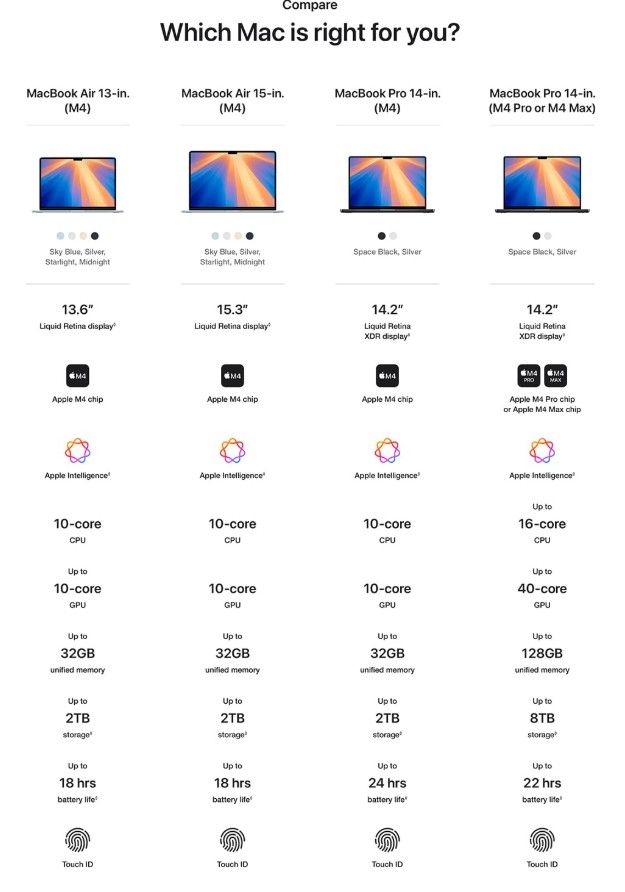
Apple currently offers two primary laptop families.
MacBook Air Apple Laptop Buying Guide
The MacBook Air is designed for:
- Students
- Everyday users
- Business professionals
- Remote workers
- Travelers
It prioritizes portability, battery life, and value.
MacBook Pro
The MacBook Pro is designed for:
- Developers
- Designers
- Video editors
- Engineers
- Creative professionals
- Power users
It focuses on maximum performance and professional workflows.
Determine Your Primary Use Case
The first step in choosing a MacBook is identifying how you plan to use it.
Common User Categories
- Students
- Office workers
- Entrepreneurs
- Software developers
- Graphic designers
- Video editors
- Content creators
- Business executives
Your workload should guide your purchasing decision.
Best MacBook for Students
Students typically require:
- Portability
- Affordability
- Long battery life
- Reliable performance
Recommended Model
MacBook Air
Why?
The MacBook Air provides:
- Lightweight design
- Excellent battery life
- Fast performance
- Affordable entry pricing
It handles coursework, research, presentations, and online learning effortlessly.
Best MacBook for Business Professionals
Business users often prioritize productivity and mobility.
Recommended Model
MacBook Air or MacBook Pro 14-inch
Ideal Tasks
- Email management
- Video conferencing
- Document creation
- Spreadsheet analysis
- Cloud applications
Both models provide exceptional reliability and efficiency.
Best MacBook for Software Developers
Developers require strong processing power and multitasking capabilities.
Recommended Model
MacBook Pro 14-inch
Benefits
Developers gain:
- Faster compilation times
- Excellent multitasking
- Efficient terminal workflows
- Strong battery performance
The MacBook Pro is ideal for professional development environments.
Best MacBook for Graphic Designers
Design professionals need accurate displays and responsive performance.
Recommended Models
- MacBook Pro 14-inch
- MacBook Pro 16-inch
Benefits
These models provide:
- Professional-grade displays
- Powerful graphics performance
- Smooth creative workflows
They excel in applications like Photoshop, Illustrator, and Figma.
Best MacBook for Video Editors
Video editing requires significant computing resources.
Recommended Model
MacBook Pro 16-inch
Why?
The larger MacBook Pro offers:
- Maximum processing power
- Advanced cooling
- Large display workspace
- Faster rendering performance
Professional editors benefit greatly from its capabilities.
Best MacBook for Content Creators
Content creators often balance portability and performance.

Recommended Models
- MacBook Air
- MacBook Pro 14-inch
Benefits
These models support:
- Photo editing
- Social media content creation
- Podcast production
- Video production
The ideal choice depends on project complexity.
Understanding Apple Silicon
Apple Silicon has revolutionized laptop performance.
What Makes It Special?
Apple Silicon combines:
- CPU performance
- Graphics processing
- Neural Engine AI acceleration
- Unified memory
into a highly efficient architecture.
Benefits
Users enjoy:
- Faster performance
- Better battery life
- Reduced heat
- Improved multitasking
This technology powers every modern MacBook.
Choosing the Right Screen Size
Display size affects both productivity and portability.
Smaller Displays
Advantages include:
- Easier transportation
- Lower weight
- Greater mobility
Larger Displays
Benefits include:
- More workspace
- Better multitasking
- Improved creative workflows
Choose based on your work style and mobility needs.
Understanding Memory (RAM)
Memory significantly affects multitasking performance.
Basic Users
Suitable for:
- Web browsing
- Office applications
- Streaming media
Professional Users
Require more memory for:
- Software development
- Video editing
- Graphic design
- Virtual machines
Purchasing sufficient memory helps future-proof your laptop.
Choosing the Right Storage Capacity
Storage determines how much data your MacBook can hold.
Consider Storage Needs
Files may include:
- Documents
- Photos
- Videos
- Design assets
- Applications
Recommendations
Light users can choose smaller storage configurations, while creators and professionals should consider larger capacities.
Battery Life Considerations
Battery performance remains one of Apple’s greatest strengths.
Why It Matters
Users increasingly work from:
- Offices
- Homes
- Universities
- Airports
- Coffee shops
MacBook Advantages
Modern MacBooks deliver:
- All-day battery life
- Efficient power management
- Consistent performance
This flexibility supports mobile productivity.
Display Quality Matters
Apple’s Retina displays are among the best in the industry.
Key Features
Users benefit from:
- Sharp text
- Accurate colors
- High brightness
- Excellent contrast
Ideal For
- Designers
- Photographers
- Video editors
- Everyday productivity
Display quality can significantly impact your overall experience.
Portability vs Performance
One of the most important buying decisions involves balancing portability and performance.
MacBook Air
Best for:
- Mobility
- Travel
- Everyday productivity
MacBook Pro
Best for:
- Intensive workloads
- Professional software
- Creative projects
Understanding your priorities helps narrow your options.
macOS Advantages
Apple’s operating system provides several benefits.
Key Strengths
- Stability
- Security
- Simplicity
- Long-term support
Benefits
Users enjoy a streamlined computing experience with fewer maintenance concerns.
Security Features
Security is increasingly important for modern users.
MacBook Security Benefits
Apple includes:
- Secure authentication
- Hardware-based protection
- Data encryption
- Privacy controls
These features help safeguard personal and professional information.
Ecosystem Integration
One of Apple’s greatest advantages is ecosystem connectivity.
Compatible Devices
MacBooks work seamlessly with:
- iPhone
- iPad
- Apple Watch
- AirPods
Benefits
Users can:
- Share files instantly
- Synchronize data
- Continue tasks across devices
This integration improves convenience and productivity.
Long-Term Software Support
Apple provides software updates for many years.
Advantages
Users receive:
- Security patches
- New features
- Performance improvements
This extends the useful life of the device and increases overall value.
MacBook Air vs MacBook Pro
Choose MacBook Air If You:
- Are a student
- Travel frequently
- Prioritize portability
- Want the best value
Choose MacBook Pro If You:
- Edit videos
- Design graphics
- Develop software
- Need maximum performance
The right choice depends on your workload and budget.
Budget Considerations
MacBooks are premium devices, but their long lifespan often justifies the investment.
Why They Offer Good Value
Factors include:
- Durability
- Performance
- Software support
- Resale value
Many users keep their MacBooks for several years, reducing the total cost of ownership.
Common Mistakes to Avoid
When purchasing a MacBook, avoid:
- Buying too little storage
- Underestimating memory needs
- Choosing performance you won’t use
- Ignoring portability requirements
Careful planning helps maximize your investment.
Future-Proofing Your Purchase
Technology evolves rapidly.
Smart Buying Strategies
Consider:
- Future software requirements
- Long-term storage needs
- Professional growth
- Expanding workloads
A slightly higher investment today may extend the laptop’s useful life.
Why MacBooks Continue Leading the Premium Laptop Market
Apple remains a market leader because of:
- Apple Silicon innovation
- Premium hardware
- Outstanding battery life
- Exceptional displays
- Strong security
- Seamless ecosystem integration
These strengths make MacBooks a preferred choice for millions of users worldwide.
Conclusion
Finding the perfect MacBook starts with understanding your needs, workflow, and budget. The MacBook Air remains the best choice for students, business professionals, remote workers, and everyday users seeking portability, affordability, and exceptional battery life. Meanwhile, the MacBook Pro lineup is ideal for developers, designers, video editors, engineers, and creative professionals who require maximum performance for demanding workloads.
By carefully considering factors such as performance requirements, display size, memory, storage, battery life, and portability, you can confidently choose a MacBook that will serve you well for years to come. Thanks to Apple Silicon, macOS optimization, premium design, and long-term software support, a MacBook remains one of the smartest laptop investments available in 2026 and beyond.
