Post
MacBook Air vs MacBook Pro: A Complete Buying Guide
Jun
MacBook Air vs MacBook Pro: A Complete Buying Guide
Choosing between the MacBook Air and MacBook Pro is one of the most common decisions facing students, professionals, entrepreneurs, and creative users today. Both laptops are part of Apple’s highly successful MacBook lineup and benefit from the company’s powerful Apple Silicon technology, premium build quality, long battery life, and seamless macOS experience. However, while they share many similarities, they are designed for different types of users and workloads.
The MacBook Air focuses on portability, efficiency, and value, making it an excellent choice for everyday users and students. The MacBook Pro, on the other hand, is built for professionals who need maximum performance for demanding tasks such as video editing, software development, graphic design, and content creation.
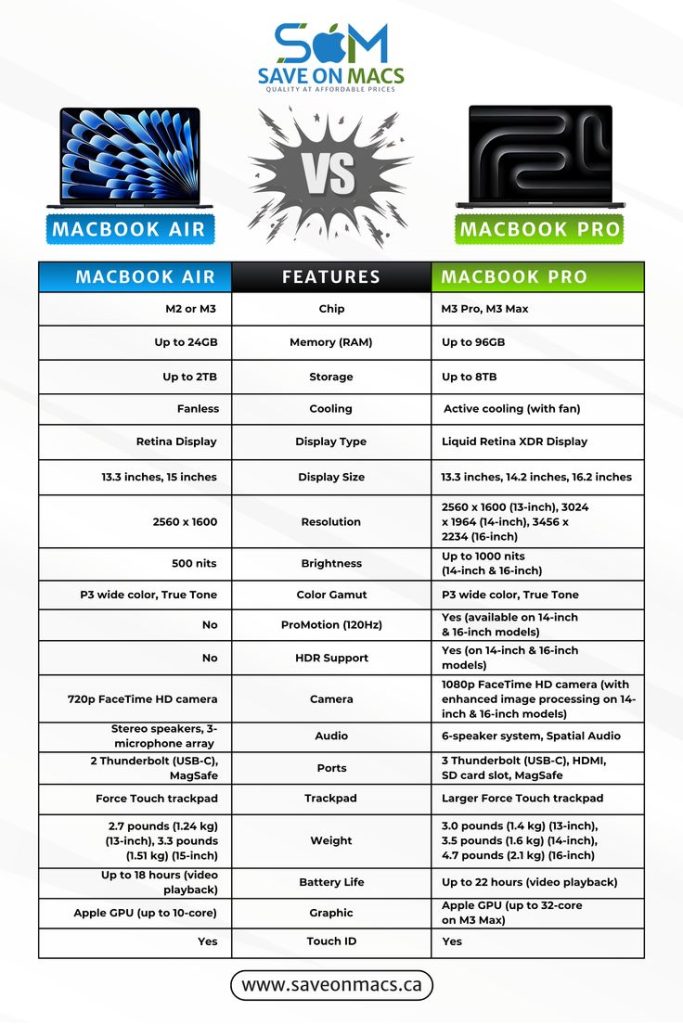
This complete buying guide compares MacBook Air and MacBook Pro across design, performance, battery life, display quality, portability, pricing, and overall value to help you choose the right Apple laptop for your needs.

Understanding Apple’s MacBook Lineup
Apple currently offers two primary laptop families:
MacBook Air MacBook Air vs MacBook Pro
Designed for:
- Students
- Business professionals
- Remote workers
- Everyday users
- Travelers
MacBook Pro
Designed for:
- Content creators
- Developers
- Engineers
- Video editors
- Professional users
Both devices provide outstanding experiences, but their strengths differ significantly.
Design and Build Quality
Apple is known for premium hardware design.
Similarities
Both MacBook Air and MacBook Pro feature:
- Aluminum unibody construction
- Premium materials
- Elegant aesthetics
- Excellent durability
Result
Regardless of which model you choose, you’ll receive a premium laptop built to Apple’s high standards.
Portability Comparison
For many users, portability is a deciding factor.
MacBook Air Advantages
The MacBook Air is:
- Thinner
- Lighter
- Easier to carry
- Designed for mobility
Ideal Users
Perfect for:
- Students
- Travelers
- Remote workers
- Frequent commuters
MacBook Pro Advantages
While still portable, the MacBook Pro prioritizes performance over extreme portability.
Winner
MacBook Air
For users constantly on the move, the Air is the more convenient option.
Performance Overview
Performance is one of the biggest differences between the two models.
MacBook Air Performance
The MacBook Air excels at:
- Web browsing
- Office applications
- Online learning
- Video conferencing
- Content consumption
- Everyday productivity
MacBook Pro Performance
The MacBook Pro is optimized for:
- Professional video editing
- Software development
- Graphic design
- 3D rendering
- Engineering applications
Winner
MacBook Pro
For demanding workloads and professional applications.
Cooling System Differences
Cooling affects long-term performance.
MacBook Air
The MacBook Air uses a fanless design.
Benefits
- Silent operation
- Lightweight construction
- Energy efficiency
Limitations
Under prolonged heavy workloads, performance may reduce slightly to manage heat.

MacBook Pro
The MacBook Pro includes active cooling systems.
Benefits
- Sustained performance
- Better thermal management
- Improved efficiency during demanding tasks
Winner
MacBook Pro
For intensive workloads and extended processing tasks.
Battery Life Comparison
Battery life remains one of Apple’s strongest advantages.
MacBook Air
Offers:
- Excellent battery efficiency
- All-day productivity
- Outstanding portability
MacBook Pro
Provides:
- Exceptional battery performance
- Longer endurance under demanding workloads
Winner
Tie.
Both laptops offer industry-leading battery life, though exact results depend on usage patterns.
Display Quality
The display plays a major role in productivity and creative work.
MacBook Air Display
Provides:
- Sharp resolution
- Excellent brightness
- Accurate colors
MacBook Pro Display
Offers:
- Higher brightness levels
- Enhanced visual technologies
- Superior professional viewing experiences
Best For
Creative professionals often benefit more from the Pro’s display capabilities.
Winner
MacBook Pro
Especially for design, photography, and video editing.
Audio Experience
Sound quality is important for meetings, entertainment, and content creation.
MacBook Air Audio
Features:
- Clear speakers
- Quality microphones
- Excellent video call performance
MacBook Pro Audio
Provides:
- More powerful speakers
- Enhanced spatial audio
- Professional-grade sound quality
Winner
MacBook Pro
For users who prioritize audio performance.
Webcam and Video Conferencing
Remote work and online learning remain important in 2026.
Shared Benefits
Both models offer:
- High-quality cameras
- Advanced image processing
- Reliable conferencing performance
Winner
Tie.
Both devices perform exceptionally well for virtual meetings and online classes.
Apple Silicon Performance
Apple Silicon has transformed the laptop market.
Benefits Across Both Models
Users enjoy:
- Fast application launches
- Excellent efficiency
- Smooth multitasking
- Reduced power consumption
Differences
MacBook Pro models often include higher-performance chip options designed for professional workloads.
Winner
MacBook Pro
For maximum processing power.
Memory and Multitasking
Modern workflows often require multiple applications simultaneously.
MacBook Air
Handles:
- Productivity apps
- Research projects
- Communication tools
- Everyday multitasking
MacBook Pro
Excels at:
- Large creative projects
- Professional software
- Advanced multitasking
Winner
MacBook Pro
For users running demanding workflows.
Storage Options
Storage affects project management and productivity.
MacBook Air
Suitable for:
- Documents
- Schoolwork
- Everyday files
MacBook Pro
Ideal for:
- Large video projects
- Photography libraries
- Software development environments
Winner
Depends on workload requirements.
Both offer fast SSD storage solutions.
Best for Students
Students require:
- Portability
- Reliability
- Affordability
- Battery life
Recommended Choice
MacBook Air
Why?
- Lightweight design
- Excellent performance
- Lower cost
- Outstanding battery life
The Air remains the best MacBook for most students.
Best for Business Professionals
Business users need:
- Productivity
- Mobility
- Reliability
Recommended Choice
For most professionals:
MacBook Air
For power users:
MacBook Pro
The choice depends on workload intensity.
Best for Graphic Designers
Designers benefit from:
- Accurate displays
- Strong performance
- Graphics capabilities
Recommended Choice
MacBook Pro
Its display and processing power make it ideal for creative work.
Best for Video Editors
Video editing requires significant computing resources.
Recommended Choice
MacBook Pro
The Pro offers:
- Better thermal management
- Faster rendering
- Enhanced multitasking
These advantages significantly improve editing workflows.
Best for Software Developers
Developers often run:
- Virtual environments
- Development tools
- Testing platforms
Recommended Choice
MacBook Pro
Especially for large projects and professional development environments.
Best for Content Creators
Content creators require:
- Editing capabilities
- Graphics performance
- Mobility
Recommended Choice
For casual creators:
MacBook Air
For professional creators:
MacBook Pro
The choice depends on project complexity.
Price Comparison
Pricing is often a major factor.
MacBook Air
Advantages:
- More affordable
- Excellent value
- Lower entry cost
MacBook Pro
Advantages:
- Higher performance
- Professional features
- Better scalability
Winner
MacBook Air
For budget-conscious buyers.
Long-Term Value
Both laptops offer excellent longevity.
Shared Benefits
Apple provides:
- Long software support
- Security updates
- Strong resale values
Result
Both devices maintain value better than many competing laptops.
Quick Comparison Table
| Feature | MacBook Air | MacBook Pro |
|---|---|---|
| Portability | Excellent | Very Good |
| Performance | Excellent | Outstanding |
| Battery Life | Excellent | Excellent |
| Cooling | Fanless | Active Cooling |
| Display Quality | Excellent | Outstanding |
| Audio | Very Good | Excellent |
| Price | Lower | Higher |
| Student Use | Excellent | Very Good |
| Creative Work | Good | Excellent |
| Professional Workloads | Good | Excellent |
Who Should Buy a MacBook Air?
Choose the MacBook Air if you:
- Are a student
- Travel frequently
- Need portability
- Want excellent battery life
- Prefer a lower price point
- Use productivity applications
The Air offers exceptional value and performance for most users.
Who Should Buy a MacBook Pro?
Choose the MacBook Pro if you:
- Edit videos professionally
- Design graphics regularly
- Develop software
- Run demanding applications
- Need maximum performance
- Require sustained processing power
The Pro is built for professionals who push their laptops to the limit.
Future of the MacBook Air and MacBook Pro
Apple continues investing heavily in:
- Advanced Apple Silicon chips
- Artificial intelligence features
- Improved battery technology
- Enhanced displays
- Sustainable manufacturing
These innovations will continue strengthening both product lines in the years ahead.
Conclusion
When comparing the MacBook Air vs MacBook Pro, there is no universal winner—only the right choice for your specific needs. The MacBook Air is the ideal laptop for students, remote workers, business professionals, and everyday users who value portability, affordability, and outstanding battery life. It delivers remarkable performance for most tasks while maintaining a lightweight and travel-friendly design.
The MacBook Pro, however, is designed for professionals who require maximum computing power for demanding workloads such as video editing, graphic design, software development, engineering, and content creation. Its superior display, advanced cooling system, enhanced audio, and higher performance capabilities make it one of the best professional laptops available.
By understanding your workflow, performance requirements, and budget, you can confidently choose the MacBook that will support your productivity, creativity, and success for years to come.
